

Introduction: Board presentations aren’t just about information, they’re about confidence
A board presentation connects company performance to strategic choices. It gives directors enough context to challenge assumptions, assess risk, and contribute to decisions.
AI makes it easier to produce more slides. That raises the standard for what deserves a slide. The real preparation is deciding which questions require the board’s attention and what evidence will help answer them.
You can arrive with accurate numbers and still leave the board uncertain about your leadership. The gap is often in the explanation: what changed, why it happened, and what you recommend doing next.
Key takeaways
- Lead with the decisions and issues that need board attention.
- Connect results to evidence, implications, and a clear recommendation.
- Use AI to accelerate drafting, then verify the analysis and own the judgment.
1. What board members actually want
Directors need a reliable view of business performance and management’s response. Organize your thinking around four questions:
- Are we delivering against the plan?
- What explains the gap between expectations and results?
- Which risks or opportunities could change our direction?
- Where do we need board input or approval?
Choose metrics that help answer those questions. Revenue growth may look healthy while retention deteriorates. Showing both gives directors a better basis for assessing whether growth can continue.
Use consistent definitions across meetings so the board can evaluate progress over time.
2. The problem with most board decks
Board decks often inherit the company’s org chart: finance reports, sales reports, marketing reports, then product reports. Each department gets its slides, but the board has to assemble the business story.
A better organizing principle is the issue that crosses those functions. If growth slowed, connect pipeline quality, sales conversion, and customer retention in the same discussion.
Move supporting detail into a pre-read or appendix. Keep evidence needed to evaluate a recommendation in the main deck.
3. The core structure of a high-confidence board deck
Use these six sections as a starting point, adjusting the emphasis to the company’s stage and the meeting’s agenda.
Executive summary
Open with the most consequential developments, management’s assessment, and the questions requiring discussion. State whether you’re seeking advice, alignment, or a formal decision.
Performance overview
Show actual results against the plan and the prior period. Include the financial and operating measures that explain business health, such as revenue, cash runway, retention, or delivery milestones. Identify material variances.
Key insights
Explain what the evidence suggests. Separate observed changes from possible causes. If conversion fell after a pricing change, say whether you have evidence linking the two or are still investigating.
Risks & opportunities
Describe the exposure, potential impact, and management response. For an opportunity, show the investment required and what would justify continuing. Name assumptions that could change your recommendation.
Strategic focus
Identify the priorities leadership is committing resources to and the tradeoffs involved. If you recommend expanding enterprise sales, explain which other investment will receive less funding or attention.
Next steps
Close with specific actions, owners, and dates. For each board decision, record the request and how progress will be assessed at the next meeting.
4. Designing for clarity and trust
Write slide headlines that state a supported conclusion. “Revenue grew 12%, below our 18% plan” tells directors more than “Revenue Update.”
Choose visuals around the question. A line chart can show a trend; a waterfall can explain a change; a comparison table can clarify options.
Keep periods, units, and metric definitions visible. Label forecasts and estimates. Explain changes to reporting methods, and use comparable chart scales where comparisons matter.
5. Where AI helps in board prep
AI is useful when the task has clear inputs and a reviewable output. It can condense operating updates, suggest an outline, shorten slide copy, or generate questions a skeptical director might ask.
With an appropriate analysis tool, it can also help explore datasets. Reconcile calculations to the source and test any proposed explanation before presenting it as a finding.
Be especially careful when summarizing mixed results. An AI-generated narrative can make uncertain evidence sound settled. Ask it to identify missing information and competing explanations.
Use approved tools for confidential board materials and follow your company’s data policies. Budget the time saved for reviewing the recommendation and preparing for questions.
6. A practical AI-assisted workflow
- Gather verified inputs. Assemble approved financials, operating metrics, the previous meeting’s commitments, and current risks. Record sources, reporting periods, and metric owners.
- Request a bounded summary. Ask AI to identify changes, unresolved questions, and possible discussion topics. Require it to distinguish facts from interpretations and flag missing evidence.
- Example prompt: “Summarize these updates for a board discussion. Use only the supplied facts. Identify performance gaps and unanswered questions. Do not infer causes or invent figures.”
- Build the narrative. Decide what the board needs to understand and where you need its input. Confirm the recommendation before drafting slides around it.
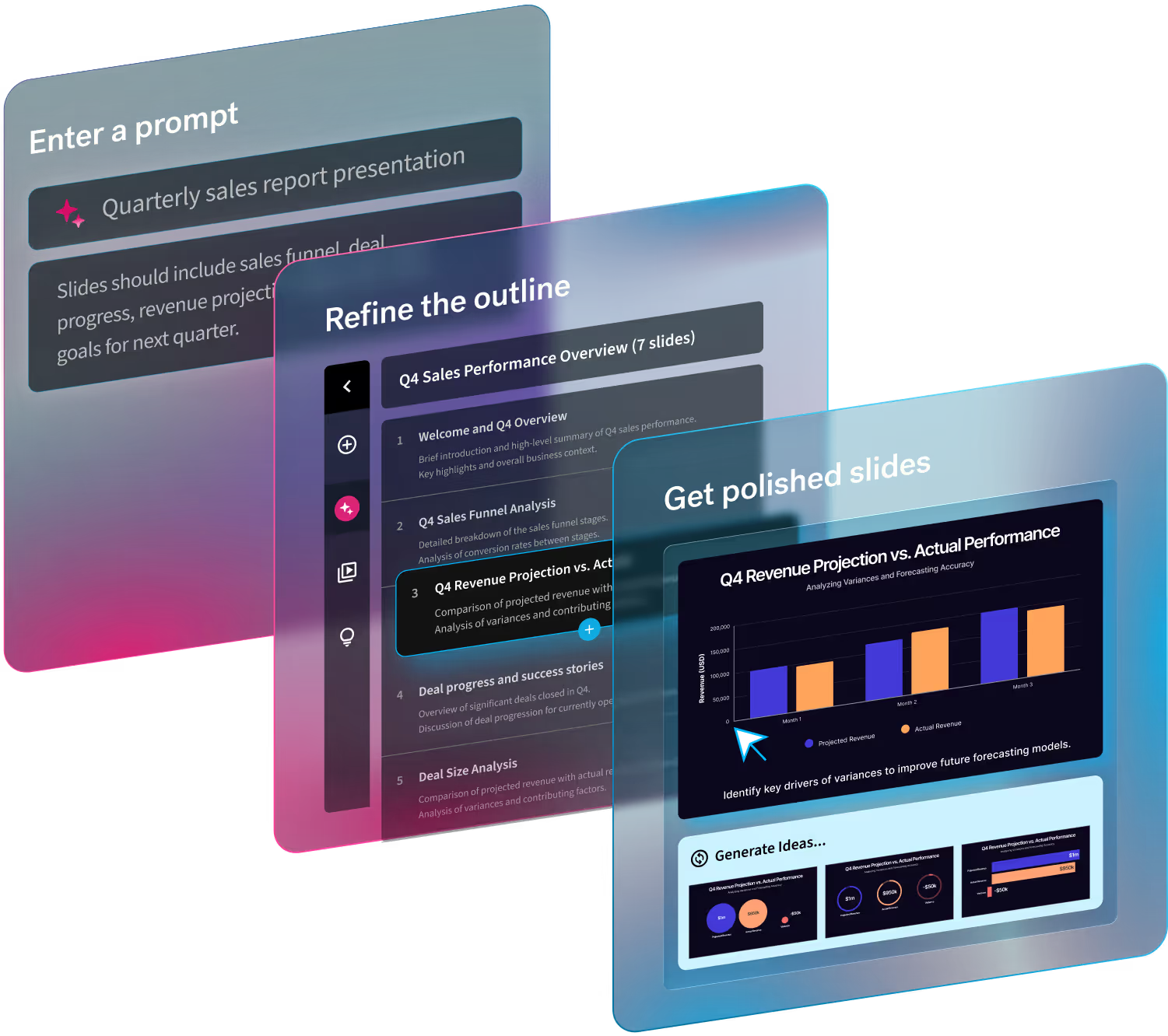
- Create the first draft. In Beautiful.ai’s Create with AI workflow, start with a prompt, outline, or source material, then review and refine the outline before generating slides. Smart Slides help you adjust layouts as the story develops.
- Validate and rehearse. Have metric owners check the numbers and relevant leaders challenge the assumptions. Practice explaining the recommendation without reading the deck.
7. What builds (or breaks) confidence in the room
Confidence grows when leaders can explain their reasoning under scrutiny.
Consider a hypothetical missed sales target. “The market was difficult” provides little basis for discussion. A more useful explanation identifies where the shortfall occurred, what evidence supports the diagnosis, and what management will change.
Be equally precise about uncertainty: “We know enterprise conversion fell. We’re testing whether procurement delays explain the decline and will report back next month.”
When you don’t know an answer, name who will investigate and when you’ll follow up. Avoid defending an explanation simply because it appears in the deck.
8. 4 common board presentations mistakes to avoid
- Overloading slides with data. Select evidence around the question being discussed. Keep supporting analysis accessible in the appendix.
- Avoiding recommendations. Explain your preferred option, alternatives considered, and the consequences of waiting.
- Over-relying on AI outputs. Check every figure and causal claim. Management remains accountable for material it presents.
- Using the same deck for every board. Adjust context and depth to directors’ knowledge, the company’s stage, and the decisions on the agenda.
9. Preparing for the discussion (not just the deck)
Send the pre-read on the timetable agreed with your board so directors can review results before the meeting. Sequoia’s guidance for early-stage boards similarly recommends distributing materials in advance to preserve meeting time for discussion.
Align internally on metric definitions, recommendations, and who will answer which questions.
Rehearse the questions most likely to change the decision: What would make this recommendation wrong? What happens if we wait? Which assumption has the greatest effect on the forecast?
You can use Beautiful.ai’s board meeting presentation template to organize materials, then adapt the agenda around the discussion you need.
Conclusion: Confidence comes from clarity
A useful board presentation makes leadership’s thinking visible. Directors should leave understanding the business position, the choices ahead, and the evidence behind management’s recommendation.
AI can reduce the work of drafting and organizing. Leaders still need to decide what matters, acknowledge uncertainty, and explain the tradeoffs.
Start with Beautiful.ai’s board report presentation template, then build each section around a question the board needs to answer. Use the time saved on formatting to test the thinking you’ll bring into the room.
Quick Tip: Start with our prebuilt Board Report Presentation Template, simply click here to download it to your dashboard and start editing.